How to Choose the Best Vacuum Forming Machine?
Choosing the best vacuum forming machine starts with the part, not the sales brochure. A shallow tray and a deep equipment cover place very different demands on a machine. Sheet size, material type, draw depth, production volume, and available floor space all shape the right choice. A machine that looks impressive may still be a poor fit.
For this guide, a fictional process engineer, Maya Chen, offers a practical reminder: “Choose for the parts you make every week, not the largest part you might make someday.” Treat that as a useful prompt, not a universal rule. Real production plans change, and a little spare capacity can prevent costly bottlenecks. Still, oversized equipment may consume space, energy, and budget without improving everyday output.
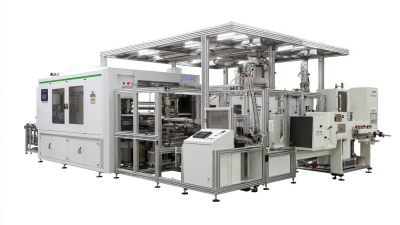
This guide explains how to compare a vacuum forming machine by heating method, forming area, vacuum performance, controls, and tooling needs. Look closely at the details: Does the heater warm the sheet evenly? Can the frame hold your material securely? Are replacement parts and technical support easy to access? Ask suppliers for sample runs using your actual sheet and mold. That test can reveal uneven corners, slow cycles, or setup problems that a specification sheet may not show. No single machine suits every shop. Start with measurable requirements, then check them against real production conditions.

Define Part Size, Draw Ratio, and Sheet Gauge in Millimeters
Choosing a vacuum forming machine starts with the finished part, not the machine’s advertised sheet size.
Measure the part’s maximum length, width, and depth in millimeters, then allow room for the flange, trim line, and spacing between cavities. A 300 × 200 mm part may need a substantially larger forming area.
That margin matters.
Check the usable forming area, since the frame and clamping system can reduce the space available.
Estimate the draw ratio by comparing the part’s depth with its opening width or diameter, and state which measurement you use. There is no single convention across every shop, so record the method with your drawing.
A deep, narrow cup puts more strain on the sheet than a shallow tray of similar footprint.
Small parts deceive.
Next, specify sheet gauge in millimeters, such as 1.5 mm, and confirm the machine can heat and clamp that thickness evenly. Thicker stock may need longer heating and stronger clamping; thin sheet can sag if heating is uneven. In practice, test the actual material and geometry before fixing machine capacity.
I still double-check these numbers: a neat drawing can hide a tight corner or a surprisingly deep pull.
Match Heating Zones to Resin Windows: PETG ~120–160°C, ABS ~150–180°C
How to Choose the Best Vacuum Forming Machine?
Match Heating Zones to Resin Windows: PETG ~120–160°C, ABS ~150–180°C
Choose a machine whose heating zones can match your sheet material, not just its size. PETG commonly softens within roughly 120–160°C, while ABS often needs about 150–180°C. These are working ranges, not guaranteed settings. Resin grade, sheet thickness, heater distance, and surface color can shift the result. A 2 mm sheet may heat differently from a thicker panel under the same lamps. Even heating matters. Cold corners can resist forming, while overheated areas may sag or lose surface quality.
Tips: Start near the middle of the resin’s range, then adjust in small steps. Watch the sheet, not only the controller. A smooth, even sag is a useful clue, but it is not a precise measurement.
When comparing machines, check whether zones can be controlled independently and whether the heating area suits your sheet dimensions. Uneven parts may point to poor zone balance, rather than an incorrect overall temperature. Record settings, cycle time, and sheet thickness for each test. I would not treat one successful run as a universal recipe. Supplier data sheets should take priority, and a test piece can reveal problems before a full production run.
Size the Clamp Frame and Forming Area for Tool Layout and Parts per Cycle
A vacuum forming machine’s clamp frame must fit the full tool, not just the finished part. Allow room for flange, trim allowance, and secure clamping. Then check the usable forming area and maximum draw depth. A tray with a wide rim may need more sheet area than its footprint suggests. Leave space between cavities for tool walls and consistent heating. Tight layouts can look efficient on paper. They can also create uneven sheet temperature or difficult trimming.
Estimate parts per cycle from the usable frame area, then confirm the layout with the toolmaker. Include sheet thickness, web spacing, and loading access; the nominal machine area is not all productive area. Grand View Research valued the global thermoformed plastics market at USD 51.4 billion in 2022 and projected 4.9% annual growth through 2030. That market figure signals broad demand, but it does not determine a suitable frame size. For process guidance, the Society of Plastics Engineers’ thermoforming technical resources emphasize matching sheet heating and forming conditions to the tool and part geometry. Ask suppliers for a layout drawing and a sample-cycle review before specifying the machine. One cavity less may be wiser. I would still revisit the first layout after a real production trial.
Check Controls, Guarding, and Utilities Against Applicable Safety Standards
When comparing vacuum forming machines, inspect the controls where an operator will actually stand. Emergency stops should be easy to reach without leaning across a hot platen or moving table. Check that guards prevent access to pinch points, and that any interlocks stop hazardous motion when a guard opens. Look for clear labels, readable status indicators, and a defined method for isolating energy during maintenance. Small details matter. A polished panel is not proof that the machine meets the safety requirements that apply at your site.
Ask the supplier for the machine’s risk assessment, operating instructions, and documentation showing which applicable safety standards were considered. Requirements vary by location and machine configuration, so have a qualified safety professional verify them rather than relying on a generic certificate. Review electrical supply, grounding, compressed-air connections, vacuum lines, and exhaust needs against the installation plan. Confirm that shutoff valves and disconnects remain accessible after the machine is positioned. Not always obvious. A hose can look secure during a demonstration yet pull loose under repeated movement. Include realistic setup, cleaning, and maintenance tasks in your review; these are often where a convenient control layout proves less convenient than expected.